
Segmenting Top-Performing Pages in Search Console
Quick answer
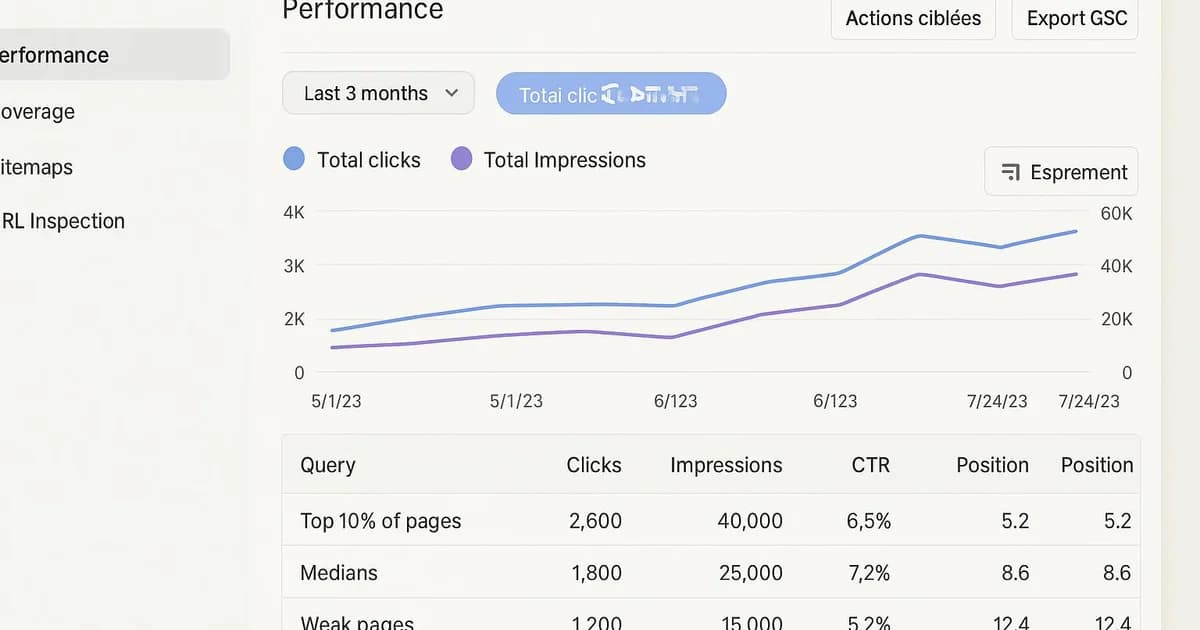
Segmenting top-performing pages in Search Console means sorting your URLs by clicks, impressions and average position to identify three groups: the top 10%, the median, and weak pages. This method helps prioritize SEO actions, spot quick wins, and focus effort where measurable impact is generally strongest.
You open Google Search Console, you see hundreds of URLs, and you don't know where to start. It's the most common problem once a site grows: not all pages are equal, yet they're displayed side by side with no clear hierarchy. The result is random optimization, or hours spent manually sorting CSV exports. Segmenting top-performing pages solves this. The idea is simple: group your URLs into categories based on their real contribution to traffic, then adapt your strategy to each group. Pages in the top 10% don't need the same treatment as weak pages. In this hands-on guide, you'll discover how to build this segmentation step by step, which metrics to use, and how tools like Selfhook can automate this sorting to save time and prioritize your SEO actions.
Definition
Top-performing page segmentation is an analysis method that classifies a site's URLs by their performance level in Google Search Console (clicks, impressions, CTR, position) to guide content strategy.
Why segment pages by performance in Search Console?
Segmenting means accepting a simple reality: on most sites, a minority of pages generates the majority of traffic. This distribution, often close to a Pareto law, means roughly 10 to 20% of your URLs can concentrate most of the clicks measured in Google Search Console. Without segmentation, you treat a page bringing 2,000 clicks a month the same as one bringing 3. That's a poor allocation of your time. Segmentation delivers three concrete benefits. First, it clarifies priorities: you immediately know which pages to protect, which to push, and which to set aside. Second, it reveals otherwise invisible opportunities — for example, a page ranked between 8th and 15th that, with a small effort, could climb. Finally, it structures your reporting: instead of one vague global figure, you track each segment's evolution. In practice, you generally observe three families of pages. Strong pages, which already rank and should be consolidated. Median pages, which have potential but stagnate. And weak pages, which bring almost nothing and must be improved, merged, or de-indexed. Each family requires a different action, to then be measured in Search Console.
- Top 10%: pages to protect and consolidate
- Median: high-potential pages, often to rework
- Weak pages: to improve, merge, or de-index
Which metrics should you use to build the segmentation?
Google Search Console provides four key metrics in the Performance report: clicks, impressions, CTR (click-through rate), and average position. Before segmenting, you need to understand what each one tells you. Clicks measure real traffic. Impressions indicate visibility in results, i.e. how many times your page was displayed. CTR is the ratio between the two, often a good signal of title and meta description relevance. Average position, finally, places your page within the search results. Good segmentation combines several of these metrics rather than one alone. Sorting only by clicks gives you the top strong pages but misses the gems. To spot opportunities, cross high impressions with low CTR: these pages are seen but not clicked. For quick wins, look for positions between 8 and 20 with decent impressions: a gain of a few spots can push the page onto the first page. A simple method is to calculate a click percentile across all your URLs. The 90th percentile and above defines the top 10%. The median zone sits around the 40th–60th percentile. The bottom of the distribution groups weak pages. This approach, detailed in our guide on SEO quick wins via Search Console, is then crossed with average position to refine.
- Clicks: identify strong pages carrying traffic
- Impressions + low CTR: pages seen but underused
- Position 8–20: ideal quick-win candidates
- Click percentile: objective basis to delimit segments
How to segment your pages concretely, step by step?
Let's get practical. The manual method starts in the Google Search Console interface. Open the Performance report, select the Pages tab, then extend the period to 3 or 6 months to smooth seasonal variations. Then export the data to CSV or Google Sheets via the API or native integration. In your spreadsheet, sort by descending click count. Calculate the total sum of clicks, then identify the URLs that make up the first 80% of traffic: these are your strong pages. Add a column with average position and CTR for each URL. Create a "segment" column with a simple formula: if clicks ≥ 90th percentile then "Top", if position between 8 and 20 then "Quick win", otherwise "Weak". This method works, but it has limits. It's time-consuming, must be redone each period, and handles sites with thousands of URLs poorly. That's exactly where automation makes full sense. Connecting the Search Console API to a tool that automatically recalculates segments on each refresh saves considerable time. Our guide on automating Google Search Console details this approach. The ultimate goal remains the same: turn a raw list of URLs into a prioritized action plan, where each page knows what treatment it should receive.
- Extend the period to 3–6 months for reliable data
- Sort by clicks and calculate the 80% cumulative
- Add average position and CTR per URL
- Create a segment column with a conditional rule
- Refresh regularly or automate the calculation
With Selfhook, this segmentation becomes automatic. The tool connects to your Google Search Console and continuously classifies your pages by performance level: top 10%, median, and weak pages. For each segment, Selfhook suggests a fitting action: consolidate a strong page, rework a high-potential median page, or generate optimized content to revive a weak page. AI generation and automated WordPress publishing then let you apply these recommendations without leaving the tool. The result: instead of sorting CSV exports by hand, you get a prioritized action plan, updated on every Search Console data refresh.
Selfhook centralizes content generation, SEO/GEO optimization, WordPress publishing and tracking in a single workflow.
See all features →FAQ
How many pages typically make up the top 10%?
It depends on site size. On most sites, the top 10% of URLs concentrates a majority share of clicks, often 70 to 80% depending on the topic. The exact percentage must be measured in your own Search Console report.
Which period should I choose to segment my pages?
A period of 3 to 6 months is generally recommended. It smooths seasonal variations and gives a more reliable picture than the last 28 days, while staying recent enough to reflect current performance.
Should weak pages be de-indexed?
Not systematically. A weak page can first be improved or merged with a nearby page. De-indexation should only be considered if the page has no potential, brings nothing, and may harm the site's overall perceived quality.
Can this segmentation be automated?
Yes. By connecting the Google Search Console API to a tool like Selfhook, segmentation recalculates automatically on each data refresh, avoiding manual CSV exports and repeated sorting.
Operational checklist
Manual vs automated segmentation
| Criterion | Manual method | Automated method |
|---|---|---|
| Time required | High, to redo each period | Low, automatic recalculation |
| Large URL volumes | Difficult beyond 1,000 URLs | Suited to thousands of URLs |
| Updates | CSV export to repeat | Continuous refresh via API |
| Action plan | To build yourself | Recommendations suggested per segment |
Key takeaways
A minority of pages often concentrates most clicks: segment to prioritize.
Cross several metrics (clicks, impressions, CTR, position) rather than one alone.
Pages in position 8–20 are often the best quick wins to work on.
Each segment requires a different action: consolidate, rework, or de-index.
Automation via the Search Console API saves considerable time on large sites.
Common mistakes
Sorting only by clicks
You spot strong pages but miss hidden high-potential opportunities.
Analyzing too short a period
Over 28 days, seasonal variations distort the segmentation and create false signals.
De-indexing too quickly
A weak page can often be improved or merged before considering de-indexation.
Never refreshing the segments
Performance evolves: a frozen segmentation quickly becomes outdated and poorly prioritized.

Related cluster articles
Reference guides
Automate with Selfhook
Conclusion
Segmenting top-performing pages in Search Console turns a raw list of URLs into a clear action plan. By distinguishing the top 10%, the median, and weak pages, you focus your efforts where measurable impact is generally strongest, instead of optimizing at random. The manual method is fine to start but quickly shows its limits on large sites. Automating this sorting, for example with Selfhook, keeps your segmentation up to date with ready-to-use recommendations. Combine this approach with automated SEO reporting, and you'll have continuous content steering, to measure over time in Search Console.
Ready to automate your SEO content?
Book a 30-minute video demo: we show you Selfhook on your WordPress site, from SEO audit to publishing.
Request a demo