
Automating Yoast SEO on WordPress: The Practical Guide 2026
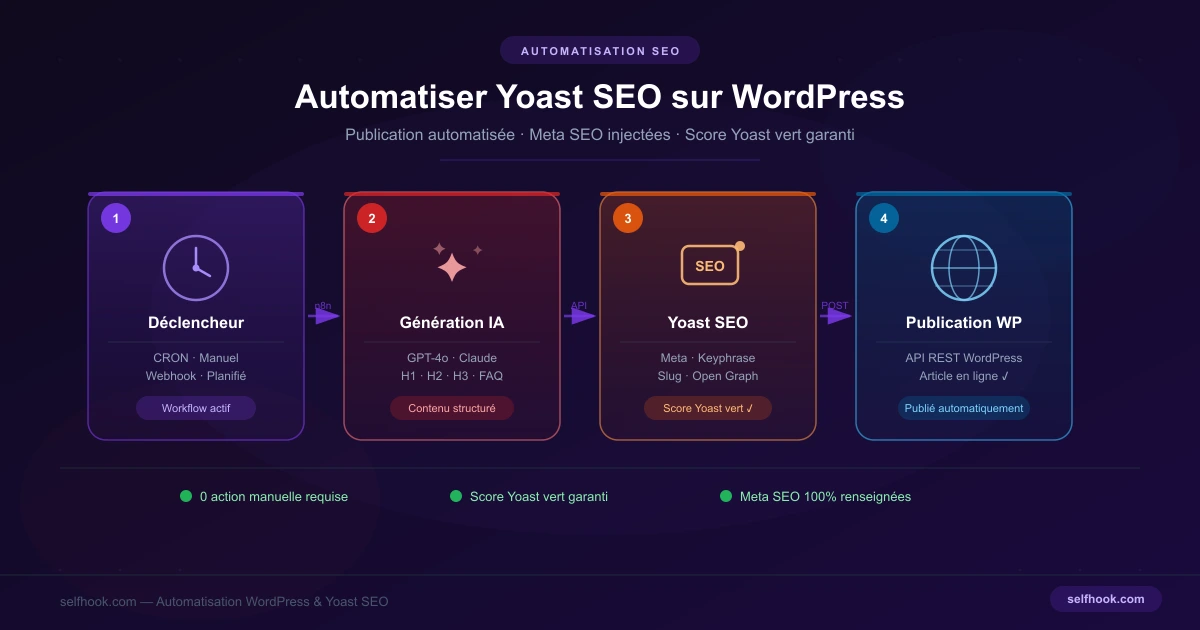
Yoast SEO is installed on millions of WordPress sites. But manually filling in all its fields — meta title, meta description, focus keyphrase — is time-consuming, repetitive and often rushed. The result: empty fields, red scores, and SEO that suffers. The good news: it is possible to automate a large part of this work without sacrificing quality.
Why Automate Yoast SEO?
On a site publishing two articles a week, correctly filling in Yoast fields takes an extra 20 to 30 minutes per publication. Multiplied by 50 articles a year, that's several hours of purely mechanical work. Automation solves three problems at once: slow manual filling, frequent forgotten fields, and inconsistency between contributors.
What Can Be Automated in Yoast SEO
Fields that are systematically automatable:
- Meta title (generated from title and keyword)
- Meta description (summary of the introduction)
- Focus keyphrase (from the keyword strategy)
- URL slug (optimized at creation)
- Open Graph tags (social media sharing)
Fields that require human validation:
- Yoast readability score (to guide, not replace)
- Internal links (depend on site structure)
- Complex structured data (FAQ, How-to)
Method 1: Using the WordPress REST API
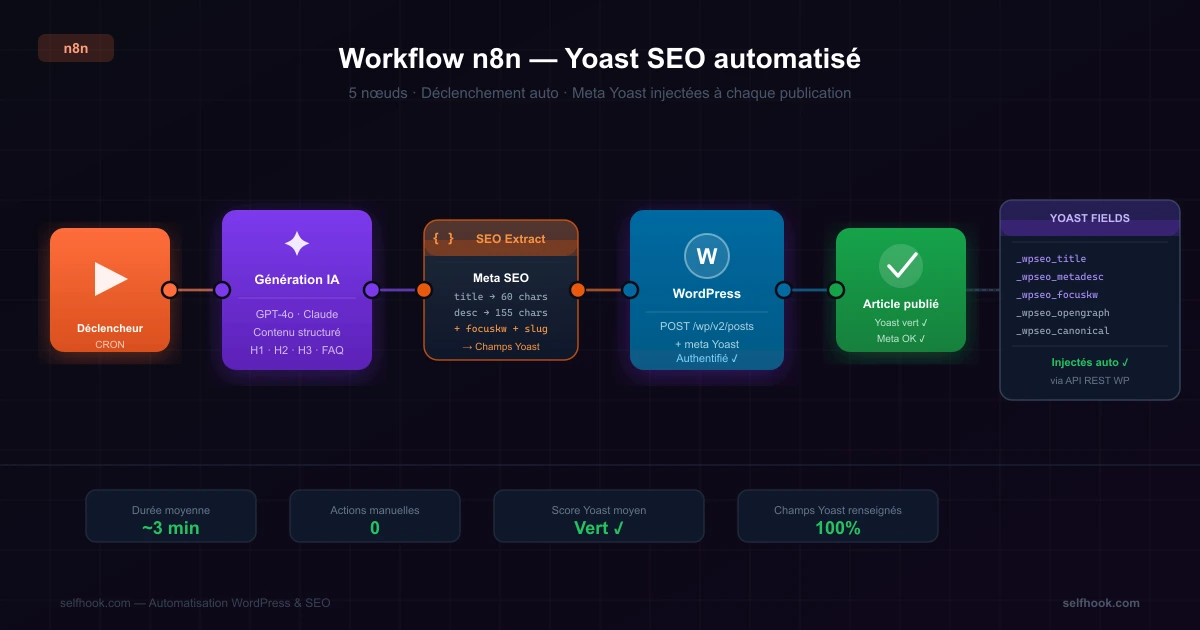
WordPress has a native REST API that allows creating and updating articles with their metadata. Yoast SEO exposes its own fields via this API. By sending a POST request to the /wp-json/wp/v2/posts endpoint, it is possible to fill in Yoast fields directly:
{
  "title": "Automatiser Yoast SEO WordPress : guide complet",
  "meta": {
    "_yoast_wpseo_title": "Automatiser Yoast SEO WordPress : guide 2026",
    "_yoast_wpseo_metadesc": "Découvrez comment automatiser Yoast SEO sur WordPress.",
    "_yoast_wpseo_focuskw": "automatiser yoast seo"
  }
}
This method works with any tool capable of calling a REST API: n8n, Make, Zapier, or a Python/Node.js script. Advantage: full control. Limitation: you need to manage WordPress authentication (Application Passwords or JWT).
Method 2: Automation via n8n
n8n is an open source automation tool particularly well-suited to this use case. The principle: an article is generated (by AI or a writer), n8n retrieves the content, a node automatically generates the Yoast fields (meta title, description, focus keyphrase), then n8n publishes the article to WordPress with all fields filled in. This workflow can be triggered manually, on webhook, or on a precise schedule.
Method 3: Dedicated WordPress Publishing Tools
Solutions like Selfhook combine content generation and SEO optimization in a single flow. Each generated article is published to WordPress with: an optimized title for the target keyword, a meta description written according to SEO best practices, a correctly filled focus keyphrase in Yoast, a clean URL slug and structured content (H2, H3, lists, FAQ). No need to build the workflow, manage authentication, or define meta templates.
SEO Best Practices to Respect
Meta title ≤ 60 characters
A truncated meta title in Google hurts click-through rate. Check the limit with each generation.
Meta description with action verb
"Discover how…", "Learn to…" — these formulations increase CTR. Avoid generic descriptions.
Focus keyphrase in intro
Yoast checks presence in title, introduction and subheadings. Include it in the generation prompt.
No duplicate content
Two articles on similar topics must not share the same introduction. Google detects and penalizes.
Solving the Orange or Red Yoast Score Problem
Focus keyphrase missing from intro
Explicitly include the keyword in the first 100 words via the generation prompt.
Subheadings without the keyword
Structure H2s around the keyword: "How to automate Yoast SEO?", "Tools to automate Yoast…"
Sentences too long
Yoast penalizes excess sentences > 20 words. Configure generation for short sentences.
Keyword density too low
Once in the title, once in the intro, once or twice in subheadings, a few natural occurrences.
Summary: What Can Be Automated in Yoast SEO
| Element | Automatable | Recommendation |
|---|---|---|
| Meta title | ✅ Yes | Max 60 chars, keyword at start |
| Meta description | ✅ Yes | 150–155 chars, with action verb |
| Focus keyphrase | ✅ Yes | Same as targeted primary keyword |
| URL slug | ✅ Yes | Short, no stop words, keyword present |
| Readability score | ⚠️ Partial | Guide generation, verify manually |
| Internal links | ⚠️ Partial | Automate suggestion, validate manually |
| Structured data | ⚠️ Partial | FAQ and How-to can be generated |
Selfhook is designed to publish WordPress articles with all Yoast fields correctly filled in, without manual intervention. The platform allows you to:
- Automatically generate optimized meta title and description
- Inject focus keyphrase into Yoast fields via REST API
- Structure content for a green Yoast score
- Publish with the correct slug and Open Graph tags
- Schedule publications on an editorial calendar
- Manage multiple WordPress sites from a single dashboard
FAQ — Automating Yoast SEO on WordPress
Is it possible to fully automate Yoast SEO?
Partially. Meta fields (title, description, keyphrase, slug) are fully automatable via the WordPress REST API. Readability score and internal links still need human validation.
Is Yoast SEO compatible with the WordPress REST API?
Yes. Yoast exposes its metadata via the REST API. You can fill in Yoast fields when creating an article via an API request, without going through the WordPress interface.
What is the difference between automating Yoast and using a bulk plugin?
Bulk optimization plugins modify fields on existing articles. Automation means filling these fields at creation time, within a publishing workflow. These are complementary approaches.
Can an automatically generated article have a good Yoast score?
Yes, if generation is properly configured. The focus keyphrase must appear in the introduction, H2s and meta. Sentences must remain short. These constraints can be built into the generation workflow.
What tools allow automating Yoast SEO on WordPress?
The most used solutions: n8n (open source workflow), Make, Zapier, or dedicated tools like Selfhook that combine content generation and Yoast-optimized WordPress publishing.
Pre-publication Checklist
Conclusion
Automating Yoast SEO on WordPress is no longer reserved for large technical teams. With the right tools, it is possible to regularly publish articles with all Yoast fields correctly filled in, without repetitive manual work. The key: automate mechanical tasks and focus editorial effort on what really matters — topic selection, angle, and added value for the reader.
Ready to automate your SEO content?
Discover how Selfhook can help you create and publish quality SEO content
Start for free